


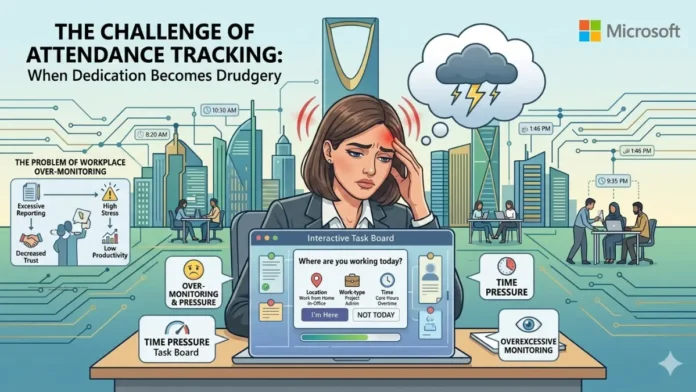
LONDON, June 18, 2026 — Microsoft Teams Workplace Check-In has officially triggered a massive wave of global outrage across corporate sectors today, as employees and privacy advocates loudly condemn the platform’s latest automated tracking mechanics. Reconfigured by Microsoft as an innocent tool to streamline hybrid office scheduling, the automated localization software is instead facing brutal backlash from global labor unions. Critics have fiercely classified the update as predatory bossware, warning that the system completely eliminates personal autonomy and strips away the fragile trust built during the remote work era. Coming alongside major cloud and operating system shifts tracked in our recent tech guides, this launch forces an intense, highly volatile conversation regarding employee surveillance versus corporate overwatch.
Network Handshakes: How the Surveillance Engine Tracks Your Every Move
The underlying technology fueling this controversial feature acts as a direct software extension of Teams’ existing manual workspace reserving matrices. The moment an employee’s laptop or mobile device establishes an active connection with a pre-configured corporate wireless network, the system triggers an immediate location relay. By registering distinct Basic Service Set Identifiers (BSSIDs) across office routing equipment, IT managers can track precise office layouts. Depending on the density of the company’s wireless infrastructure, Teams can automatically broadcast whether a user is working on the first floor, sitting inside a designated conference hall, or plugging their device directly into a configured desktop peripheral docking station.
Microsoft Teams Workplace Check-In Met With Intense Community Backlash and Corporate Fear
The core operational controversy surrounding the Microsoft Teams Workplace Check-In rollout is the deep-seated fear of inescapable micro-management. In online tech communities, forums like Reddit, and corporate legal groups, the consensus is overwhelmingly negative. Employees argue that forcing automated location tracking onto their daily profiles removes a fundamental layer of personal boundaries. Workers feel that executive leadership will weaponize real-time location metrics to rigidly audit physical presence, penalizing employees who leave their desks for short breaks or move between different office wings. Furthermore, legal advocates argue that companies will use these automated Wi-Fi logs as a stealthy compliance mechanism to build hard profiles against workers who fail to meet strict return-to-office quotas.
Compounding the community’s anger, Microsoft quietly deployed an update to the Teams web app that allows the dashboard to actively detect user interactivity scripts even if the employee is browsing secondary browser tabs. This rapid convergence of tracking signals has convinced tech personnel that modern software design is shifting away from peer-to-peer productivity toward hard behavioral monitoring, complicating workflows for independent developers exploring the best way to learn javascript to deploy non-tracking, isolated workspace tools.
Technical Safeguards: Analyzing the Privacy Override Settings
To suppress growing union anxieties and prevent legal friction across strict international labor markets, Microsoft has heavily insulated the deployment with native data privacy controls, though users remain heavily skeptical. The company maintains that the framework is strictly built for in-office socialization rather than permanent workforce auditing. The entire tracking infrastructure is locked out at the tenant level until an IT admin explicitly configures it, and individual employees must grant OS-level location permissions to trigger the sync. Furthermore, Microsoft promises that location data acts as a transient, real-time signal, meaning no historical location logs are saved or accessible to administrators, and the location client completely sleeps when connected to secure residential Wi-Fi networks.
Summary: Balancing Office Collaboration and Employee Trust
While Microsoft has built intense data-purging safeguards into this new system, the thin boundary separating standard infrastructure coordination from administrative overwatch remains highly volatile. Ultimately, the success of this automated rollout depends entirely on whether corporate management leverages it to help teams collaborate or to enforce rigid, privacy-invading tracking protocols.
Read Also:
Nvidia RTX Spark: Why the Nvidia RTX Spark Laptop AI Revolution Will Take Years, Not Months
Frequently Asked Questions (FAQ)
- Can my boss use this Teams feature to track my movements outside the office?
No. The tracking framework operates strictly when connected to corporate-configured BSSID networks and automatically defaults your profile status to “Remote” on home networks. - What happens if I refuse to grant location permissions to Microsoft Teams?
If the mandatory operating system location permissions are withheld or deactivated via your device’s settings (Privacy > Location), the automated check-in feature will remain completely non-functional. - Does the feature store a rolling history of where I sit within the office building?
According to official Microsoft engineering blueprints, location data is handled purely as an “in-the-moment” signal, meaning no historical location logs are saved or accessible to administrators.