Starlink Satellite Internet Guide (2026): Speed, Costs, and Hardware Setup.The global internet landscape is shifting rapidly, and satellite technology is at the forefront of this digital revolution. Leading this charge is SpaceX’s Starlink, which has transitioned from an ambitious experimental project into a robust, high-speed internet solution for millions of users worldwide. Whether you are living in a remote rural area, working from a mobile RV, or seeking a reliable backup network for your business, having a dependable “radar” to navigate this technology is essential.
This comprehensive Starlink satellite internet guide breaks down everything you need to know in 2026, including actual network speeds, updated pricing structures, and a step-by-step hardware setup tutorial.
What is Starlink and How Does It Work?
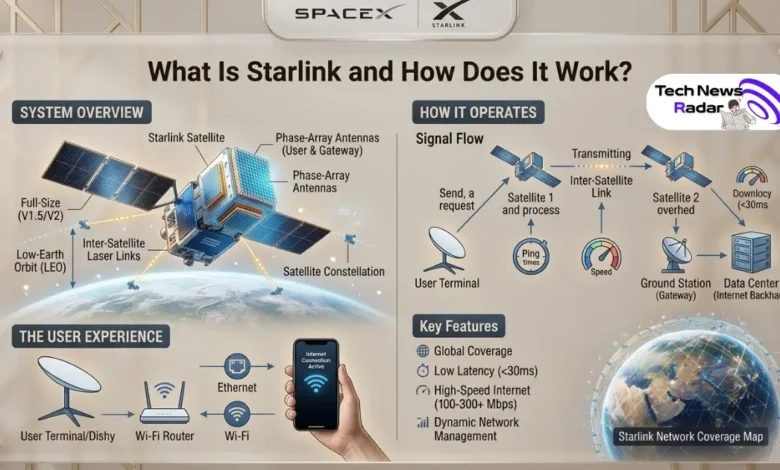
Traditional satellite internet relies on large spacecraft positioned in Geostationary Orbit (GEO), roughly 35,000 kilometers above Earth. While this covers vast areas, the immense distance results in high latency (ping), making online gaming, video conferencing, and real-time cloud automation nearly impossible.

Starlink operates differently. It utilizes a massive constellation of thousands of small satellites in Low Earth Orbit (LEO), flying at an altitude of just 550 kilometers. Because the signals travel a fraction of the distance, Starlink can deliver high-speed, low-latency connectivity that rivals terrestrial fiber-optic networks.
Starlink Performance in 2026: Speed and Latency
With the continuous deployment of SpaceX’s V2 Mini and full-sized Gen 2 satellites, Starlink’s network capacity has reached unprecedented levels. The infrastructure now handles heavier traffic loads with significantly less congestion.
Real-World Speed Benchmarks
Performance varies based on your location and service plan, but average benchmarks globally show consistent stability:
- Download Speeds: 100 Mbps to 220 Mbps (Peak bursts can reach 300 Mbps in low-density zones).
- Upload Speeds: 15 Mbps to 35 Mbps.
- Latency (Ping): 25 ms to 45 ms.
This level of latency is a game-changer, allowing remote professionals to handle seamless Zoom calls and enabling gamers to connect to cloud gaming platforms without crippling lag.
Starlink Subscription Plans and Costs
SpaceX has streamlined its service tiers to cater to residential users, travelers, and maritime operations. Below is a breakdown of the standard pricing model for hardware and monthly subscriptions:
| Service Tier | Best For | Hardware Cost (Approx.) | Monthly Subscription |
|---|---|---|---|
| Starlink Residential | Permanent homes and fixed remote offices | $499 – $599 | $90 – $120 / month |
| Starlink Mobile (Roam) | RVs, campers, and digital nomads | $599 (Portable kit) | $150 / month |
| Starlink Business | Enterprise networks and high-demand setups | $2,500 (High-Performance) | From $250 / month |
Note: Pricing may fluctuate slightly based on regional subsidies, local telecom regulations, and specific country promotions.
Step-by-Step Starlink Hardware Setup Guide
One of Starlink’s biggest advantages is its user-friendly, plug-and-play architecture. You do not need a professional technician to install it. The standard kit includes the electronic phased-array dish, a base mount, a Wi-Fi router, and the necessary power/data cables.
Step 1: Download the Official Starlink App
Before unpacking your hardware, download the official Starlink app on your iOS or Android device. The app uses augmented reality (AR) to scan your sky for potential obstructions like trees, roofs, or power lines. A 100% clear view of the sky is critical to prevent momentary dropouts.
Step 2: Assemble and Mount the Dish
Place the mounting base on a flat, stable surface (such as a roof, deck, or open yard). Insert the mast of the Starlink dish into the base until it clicks into place. Ensure the dish is free to rotate and tilt automatically; never try to force or manually move the dish yourself.
Step 3: Route the Cabling
Connect the proprietary cable to the base of the dish and route it carefully into your home. Avoid tight bends or pinching the wire in windows or doors, as this can degrade network signal quality. Plug the other end directly into your Starlink Wi-Fi router.
Step 4: Power On and Configure
Plug the router into an electrical outlet. The dish will automatically power up, tilt skyward, and spend a few minutes searching for overhead LEO satellites.
Step 5: Connect to the Local Network
Open your phone’s Wi-Fi settings and connect to the default “STINK” or “STARLINK” network. The app will prompt you to create a personalized Wi-Fi Network Name (SSID) and a secure password. Once configured, your high-speed satellite network is fully operational.
The Verdict: Is Starlink Worth It?
Starlink remains the absolute gold standard for internet connectivity wherever traditional fiber-optic or cable infrastructure is unavailable or unreliable. Its combination of rapid LEO satellite speeds, accessible hardware setups, and acceptable latency makes it a powerful asset for the modern decentralized web.
By implementing proper home network configurations and ensuring a completely unobstructed setup, you can unlock fiber-like freedom from absolutely anywhere on the planet.
Discover more from Tech News Radar
Subscribe to get the latest posts sent to your email.