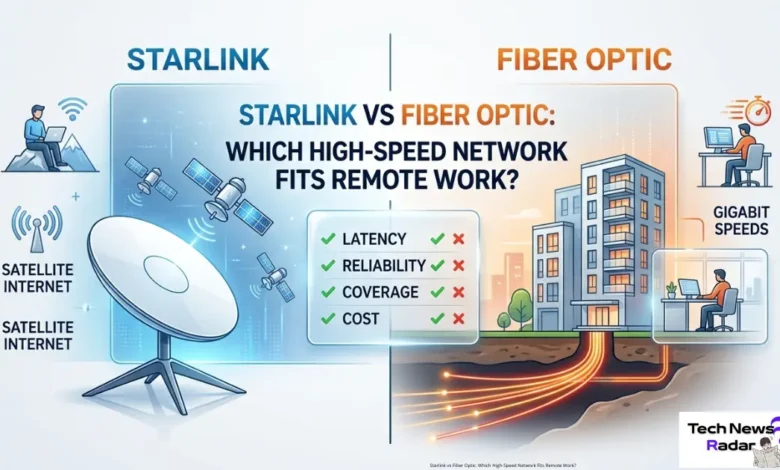
Starlink vs Fiber Optic: Which High-Speed Network Fits Remote Work?.The rise of decentralized offices and the hybrid workforce has turned reliable home internet from a luxury into a critical business utility. For remote professionals, network performance is directly tied to productivity. A dropped Zoom call, lagging cloud automation tools, or slow file transfers can disrupt an entire workday.
When searching for the ultimate high-speed connection, two major technologies dominate the conversation: traditional Fiber Optic infrastructure and SpaceX’s Low Earth Orbit (LEO) satellite network, Starlink.
But which infrastructure truly fits your remote work demands? This technical Starlink vs Fiber Optic comparison evaluates speed, latency, reliability, and deployment flexibility to help you make an informed decision.

Technical Overview: How the Infrastructures Differ
To understand network performance, we must look at how data travels through each system.
Fiber Optic Infrastructure
Fiber internet relies on physical, underground, or aerial cables packed with thin strands of glass fibers. Data is transmitted as pulses of light at roughly 70% of the absolute speed of light. Because it uses a direct physical connection from the internet service provider (ISP) to your router, it is highly insulated from outside interference.
Starlink LEO Satellite Network
Starlink bypasses ground infrastructure entirely. It transmits data via radio frequency signals between your home phased-array dish and a constellation of thousands of satellites operating in Low Earth Orbit (LEO) at an altitude of 550 kilometers. These satellites then relay the signal to local ground stations connected to the global internet backbone.
starlink-satellite-internet-guide
Face-to-Face Performance Metrics
For remote work, three core metrics define the user experience: download speed, upload speed, and latency (ping).
1. Download and Upload Speeds
- Fiber Optic: Fiber is the undisputed king of speed, routinely offering symmetrical connections ranging from 300 Mbps to 2,000 Mbps (2 Gbps). Symmetrical means your upload speed is just as fast as your download speed. This is crucial for remote workers who constantly upload large video files, code repositories, or heavy graphics assets to cloud storage.
- Starlink: Starlink provides asymmetrical speeds. In 2026, residential users typically experience download speeds between 100 Mbps and 220 Mbps, while upload speeds hover between 15 Mbps and 35 Mbps. While more than enough for daily tasks, uploading massive files will take longer compared to fiber.
2. Latency (The Zoom Test)
Latency is the time it takes for data to travel from your device to the server and back.
- Fiber Optic: Offers ultra-low latency, usually between 5 ms and 15 ms. This ensures instant response times during live video conferencing and remote desktop operations.
- Starlink: Thanks to its low-orbit satellites, Starlink delivers an impressive latency of 25 ms to 45 ms. While slightly higher than fiber, it is virtually imperceptible during daily office work, video calls, and voice-over-IP (VoIP) communications.
Reliability and Weather Resistance
- Fiber Optic: Since fiber lines are buried underground, they are completely immune to severe weather conditions like heavy rain, snowstorms, or high winds. However, they are vulnerable to physical accidents, such as construction crews accidentally cutting a mainline cable, which can result in prolonged blackouts. [36, 37, 38, 39]
- Starlink: Starlink dishes feature built-in heating elements to melt snow, and the system is designed to track satellites through light rain. However, extreme weather events like severe cloud cover, heavy thunderstorms, or torrential downpours can cause “rain fade,” temporarily degrading signal quality or causing brief dropouts.
Deployment and Mobility: Where Starlink Wins
The biggest limitation of Fiber Optic is availability. Laying down glass cables requires massive financial investment and physical digging. If you live in a rural area, a developing suburb, or a mountainous region, fiber ISPs may never build infrastructure out to your location.
This is where Starlink completely disrupts the market. It requires zero local ground infrastructure. As long as you have a clear, unobstructed view of the sky, you can get high-speed internet up and running within minutes. Furthermore, service tiers like Starlink Mobile (Roam) allow digital nomads to take their high-speed network with them on the road in an RV or camper, a feat completely impossible with fixed fiber lines.
Comparison Matrix for Remote Workers
| Feature [55, 56, 57, 58, 59] | Fiber Optic Internet | Starlink Satellite Internet |
|---|---|---|
| Max Download Speed | Up to 2,000+ Mbps | Up to 220 Mbps |
| Max Upload Speed | Up to 2,000+ Mbps | Up to 35 Mbps |
| Average Latency | 5 – 15 ms (Ultra-Low) | 25 – 45 ms (Low) |
| Weather Impact | None | Low to Moderate (Rain Fade) |
| Mobility | Fixed location only | Mobile / Portable options available |
| Availability | Restricted to urban/suburban zones | Global coverage (Clear sky required) |
The Verdict: Which Network Fits Your Remote Office?
The choice between Starlink and Fiber Optic comes down to your geographical location and the specific nature of your remote work:
- Choose Fiber Optic if: It is available at your address, and your job requires uploading massive data files, continuous remote server management, or zero-latency video streaming. It remains the most stable and cost-effective option for stationary urban workers.
- Choose Starlink if: You live in a rural or semi-isolated area where fiber or cable options are non-existent or slow (like DSL), or if you value the freedom to travel and work remotely from different locations without sacrificing network speed.
To enhance your network security and protect against digital threats, it’s recommended to adjust your router settings immediately to prevent unauthorized access. For comprehensive details on securing your device, refer to Cyber Radar’s guide on how to secure your home router from cyberattacks.
Discover more from Tech News Radar
Subscribe to get the latest posts sent to your email.